




Infoboxes
Infobox is a UI component that can be put at the beginning of a document to concisely display some facts about the object being described.
They closely resemble Wikipedia’s Infoboxes and are best used when you have multiple documents describing various objects that have some common properties.
Directive
- .. mcl-infobox::
Directive that spawns an infobox. It accepts a single required argument that will serve as infobox title and accepts content, where the infobox sections shall be described in a special syntax.
- :figure:
Relative link to an image shown after title or subtitle.
- :figure-caption:
Caption displayed under the image.
- :figure-width:
Maximum width of the image.
- :subtitle:
Subtitle displayed after the header.
Text of the footer, if needed.
- :align:
Float alignment (
left,right) or block alignment (center,auto). If not set,rightis assumed.
- :align-mobile:
Same as
align, but for small screens. If not set,centeris assumed.
- :width:
Width of infobox in pixels,
300by default.
- :margin:
Horizontal margin of infobox in pixels,
5by default. Will apply as vertical margin if effectivealigniscenter.
Syntax
Note
Infobox syntax is indentation-sensitive.
Infoboxes can contain sections and properties. Sections have a title and properties have names and values. Properties can have name or value omitted, although it is not recommended.
To produce a section heading, prefix the text with an asterisk:
* Breed standards
To produce a property, prefix it with a plus symbol:
- Other names: Ankara
- Origin: Turkey
Unlike section headings, property values can be multi-line:
- Location:
  Penacony, Hotel Reverie
You can use any inline formatting inside infobox (roles, runes etc) and directives inside property values.
Property name, like section heading, can only be single line.
Addtionally, it should have a colon (:) that delimits it from
the content/value. Colons can be escaped (\:):
- Loca\:tion:
  Penacony, Hotel Reverie
Example
The following code:
::::{mcl-infobox} Turkish Angora
:figure: ../_static/turkish-cat.jpeg
:figure-caption: Turkish Angora cat at the Atatürk Forest Farm
:figure-width: 200
:subtitle: Whitest cat you know
:footer: [Domestic Cat](https://example.com) (_Felis Catus_)
:align: left
:margin: 10

- Other names: Ankara
- Origin:
  Turkey
  :::{note}
  Disputed, I think.
  :::
- Sound: Meows
- Cuteness: Palpable

* [Breed standards](https://en.wikipedia.org/wiki/Breed_standard)
- [FIFe](https\://en.wikipedia.org/wiki/F%C3%A9d%C3%A9ration_Internationale_F%C3%A9line):
  [standard](https://www.fifeweb.org/wp-content/uploads/2023/10/TUA.pdf)
::::
Should be rendered as:
Turkish Angora
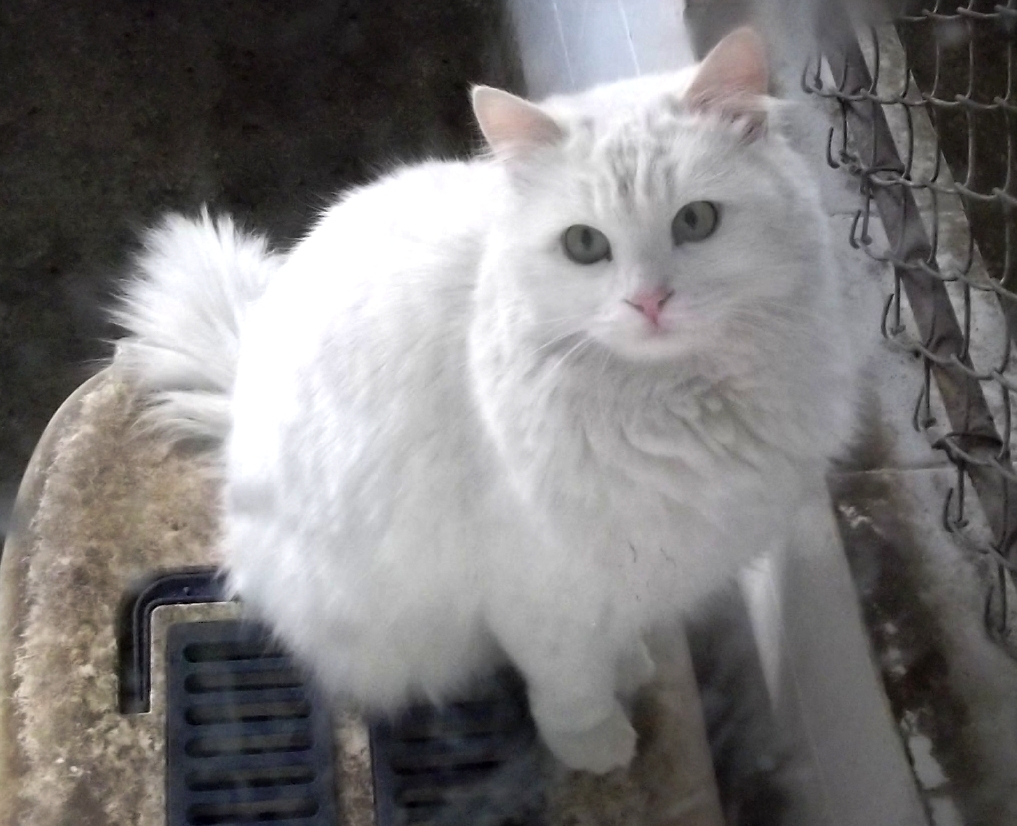
| Other names | Ankara | |
|---|---|---|
| Origin | Turkey Note Disputed, I think. | |
| Sound | Meows | |
| Cuteness | Palpable | |
| Breed standards | ||
| FIFe | ||
Lorem ipsum dolor sit amet, consectetur adipiscing elit. In varius ac elit eget bibendum. Quisque non felis vitae tortor aliquam bibendum eu a ex. Pellentesque quis quam lacinia, ultricies mauris vitae, placerat enim. Etiam lacinia turpis non quam euismod, convallis suscipit orci feugiat. In hac habitasse platea dictumst. Nulla elit justo, mattis sed ligula quis, rhoncus feugiat felis. Nulla egestas enim elit. Duis neque felis, venenatis non tincidunt quis, efficitur eget turpis. Fusce fermentum faucibus tortor, in blandit mi consectetur in.
Sed lacinia erat ac lacus hendrerit sodales. Maecenas vitae risus dapibus, lobortis nisi sed, hendrerit orci. Donec eu purus in leo efficitur ultrices. Fusce auctor lobortis risus malesuada imperdiet. Fusce mattis sodales sollicitudin. Etiam hendrerit ante vitae turpis luctus commodo. In libero ipsum, aliquet egestas velit eu, efficitur lobortis ante.
Aliquam eu aliquam diam, varius tristique justo. Sed bibendum lorem accumsan nisl consectetur gravida. Nullam rhoncus molestie euismod. Cras sit amet scelerisque diam, et dapibus velit. Suspendisse tristique dictum turpis ullamcorper convallis. Vivamus ullamcorper urna ultricies, pretium leo in, pellentesque sem. Curabitur lectus urna, tristique at orci non, faucibus elementum diam. Donec lacinia eget quam ut hendrerit. Aenean in dui aliquam, euismod ante in, venenatis ex. Praesent pellentesque eleifend congue. Etiam ornare euismod est.
Etiam ultricies, lorem sit amet sollicitudin pulvinar, arcu eros posuere arcu, quis volutpat arcu ante sit amet ipsum. In ut neque efficitur, ornare massa sed, euismod felis. Ut eu iaculis nisi. Nullam fringilla blandit posuere. Nunc viverra nulla in turpis auctor, sit amet placerat enim pellentesque. Vivamus pretium dignissim sem, sed imperdiet dui lacinia at. Sed a suscipit neque. Suspendisse potenti.
Integer sagittis erat vitae sapien tincidunt, vel pharetra lacus placerat. In pellentesque lobortis bibendum. Nullam dictum interdum purus, quis pharetra orci mollis id. Phasellus commodo tincidunt lorem, ut laoreet dolor pulvinar vel. In mi metus, tincidunt ac faucibus a, maximus id ex. Aliquam nisl lorem, imperdiet quis lobortis non, finibus vel enim. Pellentesque tincidunt neque ac risus rutrum, volutpat fermentum ligula vestibulum. Suspendisse iaculis ultrices diam eu viverra. Integer at consectetur justo. Praesent vehicula blandit odio ut elementum. Aliquam sed aliquam lectus, suscipit pellentesque est.
Creating custom infoboxes
Since infoboxes are mostly used when there are multiple documents about objects that have same properties, it makes sense to create one infobox per “class” of objects instead of copying them to each document by hand.
Idiomatic way in Sphinx to create reusable and configurable content is to make your own directive.
You can extend the InfoBoxDirective class provided
in the sphinx_mcl_theme.directives package to
create a directive for your own infobox.
Consult the Sphinx Manual, namely the
Extending syntax with roles and directives
article to understand how to accept arguments and
options from your directive and then just build an
InfoBox object and pass it to the _def2nodes
method, like so:
def run(self):
    ibox = InfoBox(...)
    return self._def2nodes(ibox)
The infobox object looks like this:
 1@dataclass
 2class InfoBoxHeading:
 3    label: str
 4
 5@dataclass
 6class InfoBoxProperty:
 7    label: str
 8    value: str
 9
10class InfoBoxAlignment(StrEnum):
11    FLOAT_LEFT = "left"
12    FLOAT_RIGHT = "right"
13    BLOCK_CENTER = "center"
14    UA_AUTO = "auto"
15
16@dataclass
17class InfoBox:
18    label: str
19    figure: Optional[str]
20    caption: Optional[str]
21    figwidth: Optional[int]
22    subtitle: Optional[str]
23    width: Optional[int]
24    margin: Optional[int]
25    data: Sequence[InfoBoxHeading | InfoBoxProperty]
26    footer: Optional[str]
27    alignment: Optional[InfoBoxAlignment]
28    mobile_alignment: Optional[InfoBoxAlignment]
Generally, since infoboxes are supposed to look and
feel the same, you should fill all members of your
InfoBox in your directive how you see fit and
use argument for label and your options to
construct data.
If you are curious, look into how
GenericInfoBoxDirective is implemented.